
The Little Wi-Fi Dongle on Your G120 Is Going Away First
It is 2 a.m., a conveyor line is down, and the engineer standing in front of a SINAMICS G120 does not reach for a cable. She plugs in a small white module, joins its Wi-Fi network on her phone, and is looking at the full parameter set in a browser within a minute. That module — the SINAMICS G120 Smart Access, order number 6SL3255-0AA00-5AA0 — is now the first part of the G120 system to be announced for phase-out, while the drives it serves remain active products.
What has actually been announced
On Siemens' order-entry catalogue, the lifecycle status of 6SL3255-0AA00-5AA0 — listed as the SINAMICS G120 Web Server Module, product family SINAMICS G120 Smart Access — reads PM400: Announcement of product phase-out, with a PLM effective date of 1 October 2026 [1][2]. The V20 twin, 6SL3255-0VA00-5AA0, carries the same PM400 status and the same effective date [2].
Just as important is what the announcement does not contain. Siemens publishes no last-order date, no last-delivery date, no named successor and no spare-parts horizon for either module [2]. PM400 is an announcement code, not an order block: both modules were still orderable on the listings checked, with a standard delivery time of three working days [2]. In our judgement, that combination — a dated phase-out announcement with no published end date — is exactly the situation that catches plants out, because nothing forces a decision until the day ordering quietly stops being routine.
| Item | Order number | Published status | What is NOT published |
|---|---|---|---|
| SINAMICS G120 Smart Access | 6SL3255-0AA00-5AA0 | PM400, effective 1 Oct 2026; still orderable | No last-order date, no successor, no spare-parts horizon |
| SINAMICS V20 Smart Access | 6SL3255-0VA00-5AA0 | PM400, effective 1 Oct 2026; still orderable | No last-order date, no successor, no spare-parts horizon |
A short history of a small module with an outsized job
Siemens introduced the Smart Access as the wireless commissioning path for the G120 family: a WLAN web server that plugs onto the control unit and broadcasts its own access point, so a smartphone, tablet or laptop can commission, operate and diagnose the drive through a common web browser, with no additional software to install [3][4]. Siemens' own compatibility statement covers the SINAMICS G115D, G120, G120C, G120P and G120X converters at firmware V4.7 SP6 and higher [1] — a broad slice of the low-voltage drive fleet installed since the late 2010s.
The module's job list explains why engineers liked it: commissioning with a wizard, setting and saving parameters, testing the motor in JOG mode, monitoring drive data, quick diagnostics, and saving or restoring settings [5]. It also made drives in difficult-to-access places — mounted high, behind guards, in cramped cabinets — reachable without opening the cabinet door [5]. None of that made it a headline product. It was an accessory. But accessories are how daily maintenance actually gets done, and that is why losing the accessory first matters more than its price suggests.
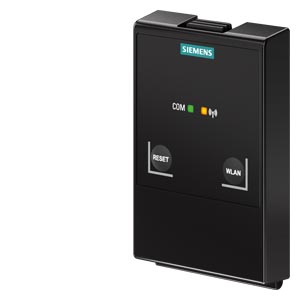
SINAMICS G120 Smart Access module, order number 6SL3255-0AA00-5AA0. Siemens product image.
The drives stay. The wireless path does not.
The asymmetry is the story. The drives the module attaches to are not going away: on the same catalogue check, the CU240E-2 PN and CU250S-2 PN control units, a representative G120C, the PM240-2 power module and the BOP-2 and IOP-2 operator panels all read PM300: Active Product [2]. Siemens has published no phase-out date for the G120 family itself, as we noted when we covered the next-generation SINAMICS G platform earlier this month. So the installed base stays, the control units stay, the panels stay — and the one commissioning path that needed no cable, no licence and no panel is the piece with a phase-out date on it.
Wired paths remain, and it is worth being precise about that rather than dramatic. Parameters can still be set from BOP-2 and IOP-2 panels, and engineering tools such as SINAMICS Startdrive in TIA Portal remain the standard wired route for the G120 family. What disappears is not commissioning itself; it is the fastest, lightest way of doing it at the machine, on a phone, at 2 a.m.
What the module is, in numbers
The following figures are from Siemens' own data sheet for 6SL3255-0AA00-5AA0 [6]. Note that published dimensions differ between Siemens documents — the catalogue D 31.1 lists 70 x 108.9 x 17.3 mm and about 0.08 kg [5], while the third-party catalogue check reports a larger packaged figure [2] — so the data-sheet electrical and radio values below are the ones to rely on, and we flag the dimension discrepancy rather than hide it.
| Data sheet item | Value (Siemens data sheet, 6SL3255-0AA00-5AA0) |
|---|---|
| Operating voltage | DC 15 V |
| Radio frequency band | 2,400.0 to 2,483.5 MHz |
| Wi-Fi compatibility | IEEE 802.11b and IEEE 802.11g listed |
| Net weight | 87.5 g (3.09 oz) |
| Degree of protection | Up to IP55 / UL Type 12, depending on the inverter enclosure |
| Ambient temperature, operation | -10 to +60 C |
| Ambient temperature, storage / transport | -40 to +70 C |
| Relative humidity | 95%, non-condensing |
| Standards compliance | CE, FCC, SRRC, WPC, ANATEL, BTK |
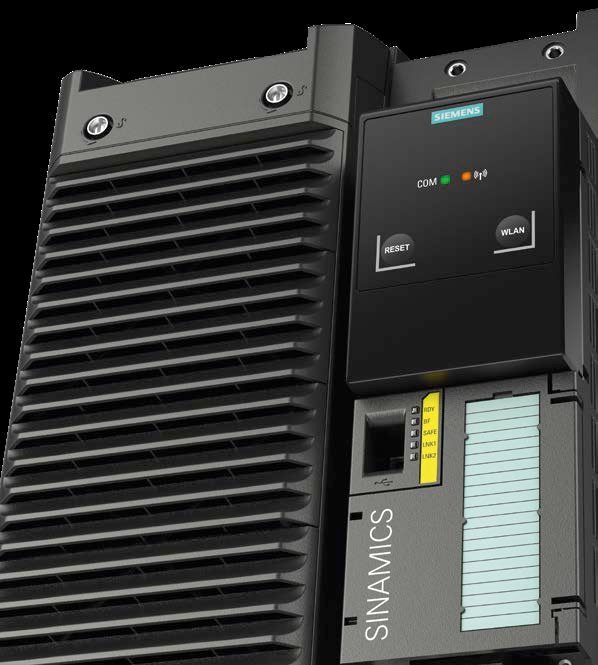
Siemens official flyer image: the SINAMICS G120 Smart Access module plugged onto a G120 control unit (WLAN and RESET buttons visible).
Our judgement, and what to do while it is still orderable
Our view: treat this as a spares problem now, not a migration problem later. The module is small, cheap relative to downtime, interchangeable across a whole fleet of drives, and — on the published record — has no successor and no last-order date to plan backwards from. A plant running G120, G120C, G120P, G120X or G115D drives at firmware V4.7 SP6 or higher does not need one spare per drive; it needs enough working Smart Access modules that a lost or failed dongle never becomes the reason a commissioning job waits. That is an inference from the published facts above, not a Siemens recommendation, and we label it as such.
Before you order anything, work through this checklist:
- Count your fleet: list every G115D, G120, G120C, G120P and G120X drive at firmware V4.7 SP6 or higher, and note which control units your team actually commissions wirelessly.
- Check what you already hold: how many 6SL3255-0AA00-5AA0 modules does the site own today, and do they all still work?
- Decide a spares number while the module is still orderable and the published delivery time is still measured in days, not in a last-order countdown.
- Practise the fallback: make sure at least one engineer per shift has commissioned a G120 by panel or by Startdrive recently, so the wired path is a habit, not a discovery. Related reading: our MICROMASTER 440 guide.
- Talk to us early if you cannot source the module locally: send the full order number from the nameplate or your asset list via /rfq, and we will check sourcing across the G120 accessory range.
Sources
[1] Siemens SiePortal, SINAMICS G120 Smart Access product page. https://sieportal.siemens.com/en-br/products-services/10344644?tree=CatalogTree [2] Petroplchub, Siemens Smart Access Phase-Out: What Breaks — third-party check of Siemens order-entry catalogue listings, October 2026. https://www.petroplchub.com/siemens-smart-access-phase-out-2026-commissioning-gap/ [3] Siemens, SINAMICS G120 Smart Access Module flyer. https://assets.new.siemens.com/siemens/assets/api/uuid:6db5be0b-494f-46a1-af8f-673680d1abfd/dfmc-a10005-01-7600sinamicsg120smartaccessmoduleen-72.pdf [4] Siemens Industry Online Support, entry 109763172, SINAMICS G120 Smart Access Module operating instructions. [5] Siemens Catalog D 31.1 (2018), SINAMICS G120 Smart Access technical specifications and function list (third-party hosted copy of the Siemens catalogue). [6] Siemens Industry Mall data sheet for 6SL3255-0AA00-5AA0. https://mall.industry.siemens.com/spice/docuservice/rest/document.spring?articleNumber=6SL32550AA005AA0&language=en®ion=ww&documentGroup=TED&documentId=DCS_DATASHEET_PMD_CLEANED
Need help finding a part?
Send your model and quantity. Our team aims to reply promptly during office hours.